
AWS Infrastructure Deployment
This guide walks you through deploying Kindo infrastructure on AWS using the kindo-infra Terraform module.
Architecture Overview
The diagram below shows the complete infrastructure topology provisioned by the kindo-infra Terraform module.
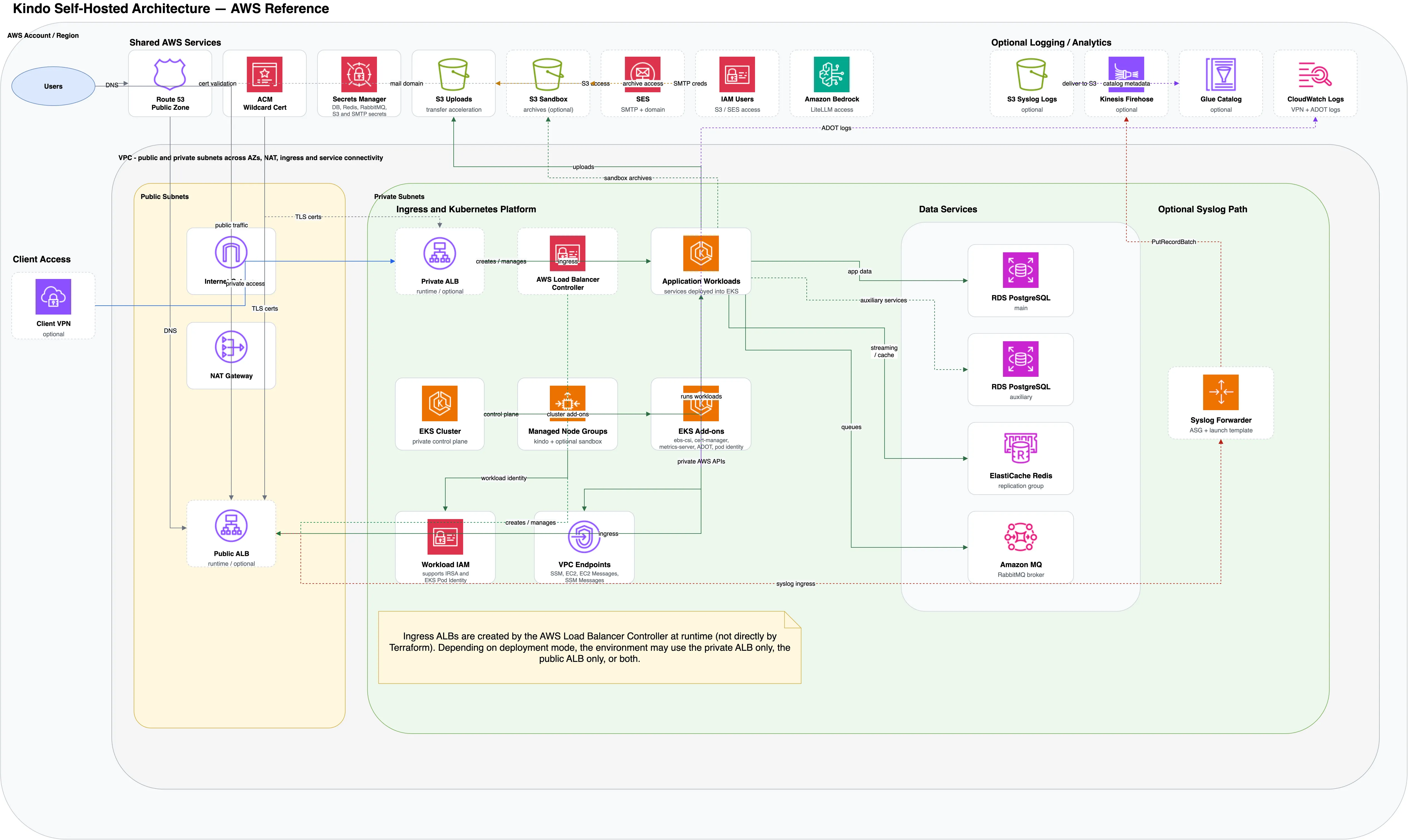
Key design points:
- Network isolation — Workloads and data services run in private subnets. Outbound traffic routes through NAT Gateways.
- Flexible ingress — The AWS Load Balancer Controller creates ALBs at runtime. Deployments can use a public ALB, private ALB, or both.
- Managed data services — RDS PostgreSQL (primary and auxiliary), ElastiCache Redis, and Amazon MQ provide the persistence and messaging layer.
- AI model access — Application workloads connect to Amazon Bedrock for LLM inference via LiteLLM.
- Optional components — Client VPN, syslog forwarding (EC2 ASG → Kinesis Firehose), and CloudWatch/Glue analytics are available but not required.
Quick Start
-
Set up your deployment directory:
Terminal window cd kindo-modules/examples/kindo-infra-aws-examplecp terraform.tfvars.example terraform.tfvars -
Configure
terraform.tfvarswith at minimum:project_name = "mycompany"environment = "production"aws_region = "us-west-2"deployment_size = "small"vpc_cidr = "10.0.0.0/16"domain_name = "kindo.mycompany.com" -
Deploy:
Terminal window export AWS_PROFILE=your-aws-profileterraform initterraform planterraform apply
Core Configuration
Project Identification
project_name = "mycompany" # Namespace for all resourcesenvironment = "production" # dev, staging, or productionaws_region = "us-west-2" # AWS regionUse lowercase with no spaces or special characters. Keep project_name consistent across environments.
Deployment Sizing
deployment_size = "small"production_mode = false| Size | Best For | Nodes | RDS | Est. Monthly Cost |
|---|---|---|---|---|
dev | Development/Testing | 1—3 t3.medium | db.t3.micro | ~$150—200 |
small | Small production | 2—5 t3.large | db.t3.small | ~$400—500 |
medium | Standard production | 3—8 t3.xlarge | db.t3.medium | ~$800—1000 |
large | High traffic | 5—15 m5.xlarge | db.m5.large | ~$2000—3000 |
xlarge | Enterprise | 10—30 m5.2xlarge | db.m5.xlarge | ~$5000+ |
Setting production_mode = true enables deletion protection on RDS and prevents accidental terraform destroy.
Network Configuration
vpc_cidr = "10.0.0.0/16"The module automatically creates public, private, and database subnets across availability zones.
Feature Toggles
enable_gpu_nodes = false # Enable for self-hosted modelsenable_monitoring = true # CloudWatch monitoringenable_bastion = false # Bastion host for debuggingWhat Gets Created
The kindo-infra module provisions:
- VPC with public, private, and database subnets across 3 AZs
- EKS cluster with managed node groups
- RDS PostgreSQL (multi-AZ in production)
- ElastiCache Redis cluster
- Amazon MQ (RabbitMQ) broker
- S3 buckets for uploads, audit logs, and backups
- KMS keys for encryption
- Security groups and network ACLs
- CloudWatch log groups and alarms
Post-Deployment Verification
# Verify EKS accessaws eks update-kubeconfig --name <cluster-name> --region us-west-2kubectl get nodes
# Verify RDSaws rds describe-db-instances --query 'DBInstances[*].DBInstanceIdentifier'
# Verify Redisaws elasticache describe-cache-clusters
# Verify S3 bucketsaws s3 ls | grep kindo
Terraform Outputs
After deployment, save these outputs for use in subsequent modules:
terraform output -json > infra-outputs.jsonKey outputs include: EKS cluster name, VPC ID, subnet IDs, RDS endpoint, Redis endpoint, RabbitMQ endpoint, and S3 bucket names.
Next Steps
Proceed to AWS Secrets Manager to configure secrets, then AWS Peripherals for supporting services.