
Use Memory
Memory lets Kindo carry useful context across conversations, so you do not have to repeat yourself in every chat. This quickstart walks through the key tasks.
Prerequisites
Section titled “Prerequisites”- A Kindo account, signed in.
- Memory turned on for your organization (it is on by default). If the Memory toggle does not appear in your chat settings menu, an administrator has turned it off — see Troubleshooting.
Turn Memory On or Off
Section titled “Turn Memory On or Off”Memory in chats is controlled by a per-user toggle. It applies to all of your chats — direct conversations with a model.
-
Open a chat.
-
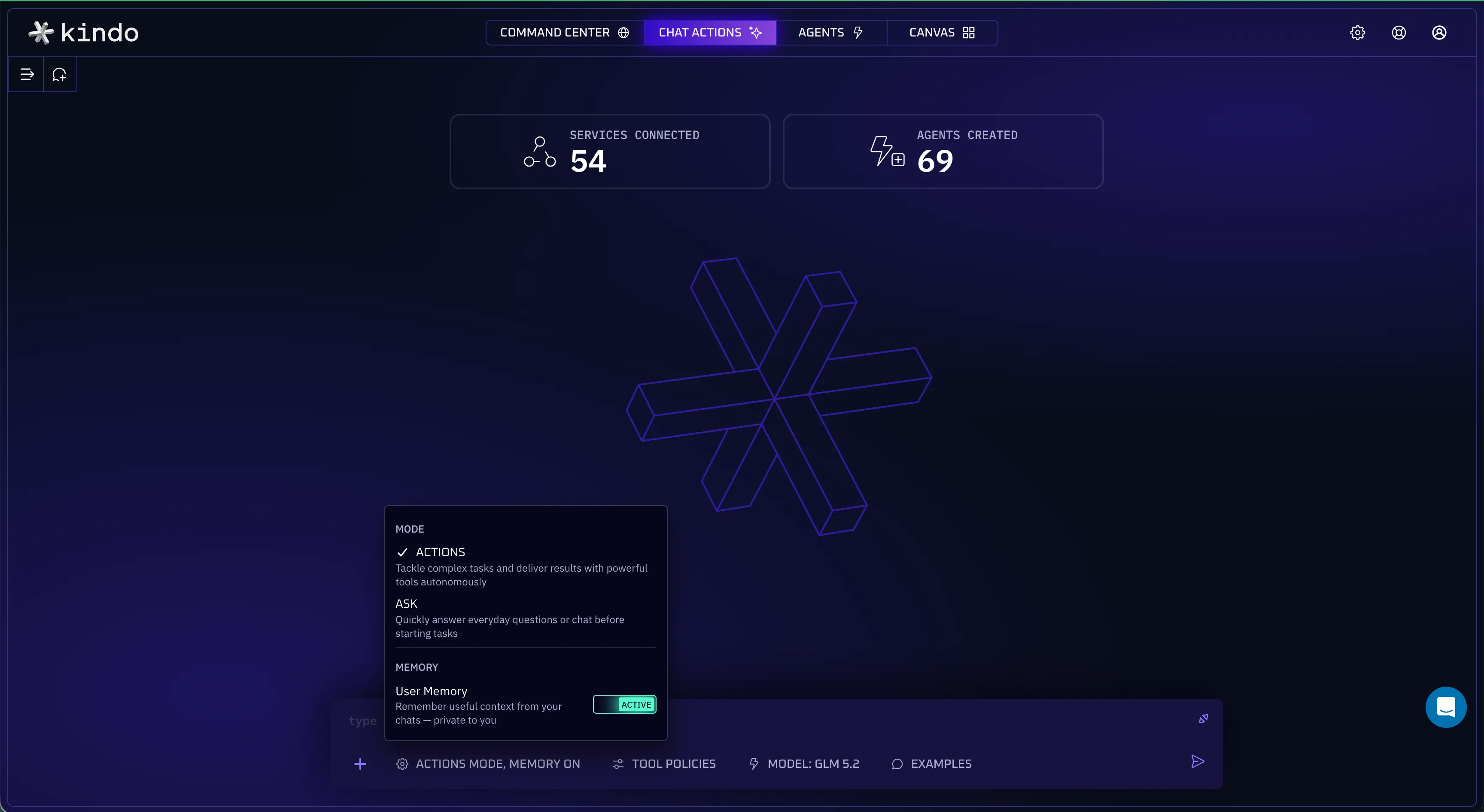
Open the chat settings menu.
-
Find the Memory toggle. When on, Kindo captures notes and recalls relevant memories in later chats. When off, neither happens.
The setting persists across sessions and affects only you. Turning Memory off does not delete anything already stored.
Ask Kindo to Remember Something
Section titled “Ask Kindo to Remember Something”-
In a chat with Memory on, tell the assistant what to remember. Be direct: “Remember that I prefer answers as bullet points.”
-
The assistant saves the fact with the
memory_storetool. The tool call appears in the conversation so you can see the save happen. -
Confirm it saved: open the User Memory page in your personal settings. The fact appears in the list.
There is no manual “create memory” form. Everything stored comes from your conversations — to add a fact, ask the assistant to remember it.
Ask Kindo to Forget Something
Section titled “Ask Kindo to Forget Something”-
In a chat, tell the assistant what to forget: “Forget my preference about bullet points.”
-
The assistant removes the memory with the
memory_forgettool — by direct reference, or by search when exactly one confident match is found. -
Confirm it is gone: check the User Memory page. The memory no longer appears.
Review, Edit, or Delete Your Memories
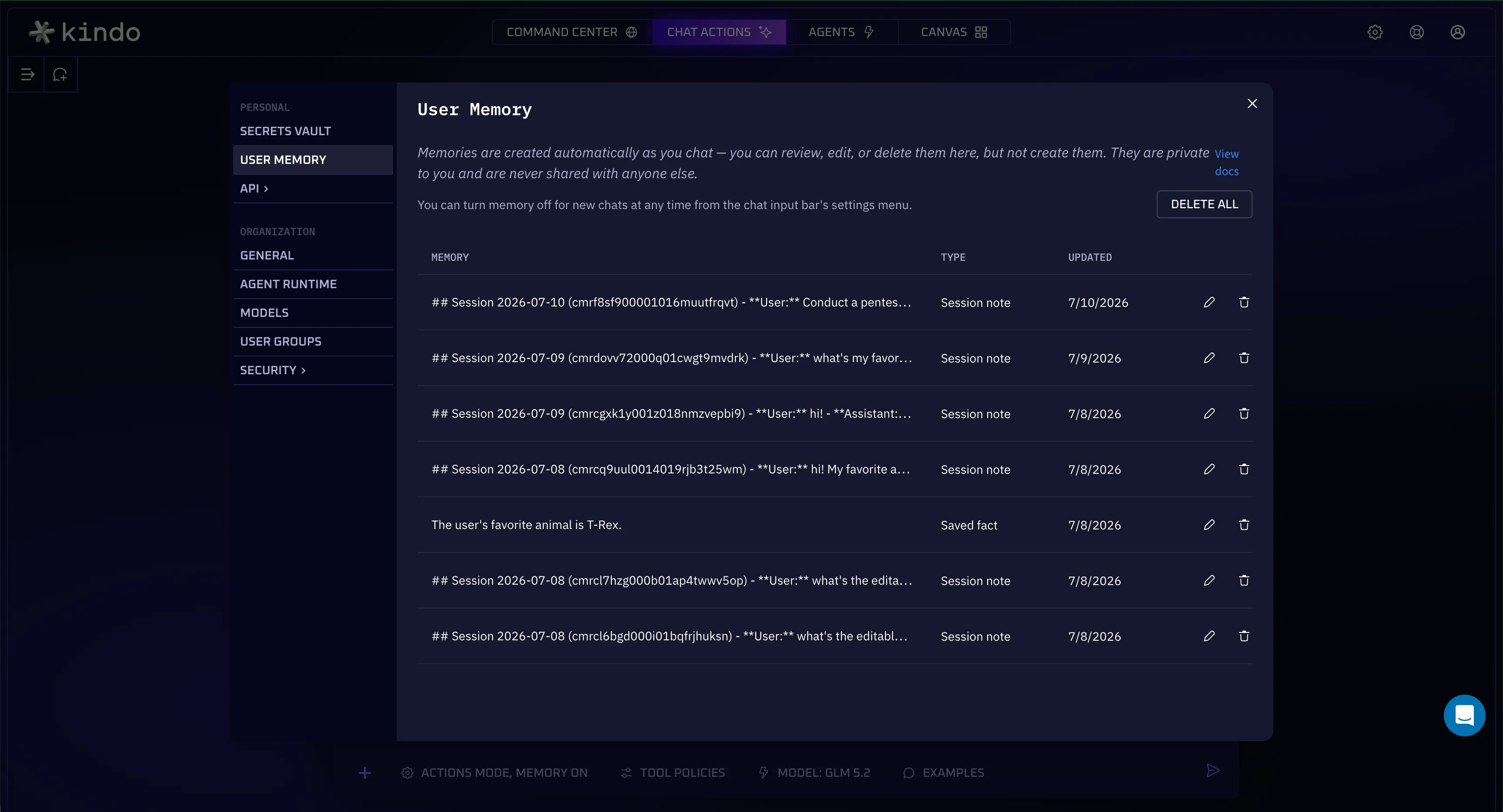
Section titled “Review, Edit, or Delete Your Memories”Every memory Kindo stores for you is visible on the User Memory page — no other user can see or search it.
-
Open your personal settings and go to the User Memory page.
-
Review the list. It contains everything memory has captured for you — conversation notes and facts you asked the assistant to remember. Nothing is hidden.
-
To correct or refine a memory, edit it in place.
-
To remove a memory, delete it. To start over completely, use Delete All.
Verify Recall Works
Section titled “Verify Recall Works”-
Save a distinctive fact, e.g.: “Remember that I prefer answers as bullet points.”
-
Start a fresh chat with Memory on.
-
Ask a question the fact applies to.
-
The response reflects the remembered preference — for this example, it arrives as bullet points.
Recall is relevance-based: Kindo searches your stored memories and provides the ones related to the current topic, not all of them.
Why the Toggle Is Greyed Out with an Agent
Section titled “Why the Toggle Is Greyed Out with an Agent”In an agent conversation, the Memory toggle in the chat settings menu is disabled. This is expected: your User Memory applies only in chats. Each conversation uses exactly one memory space — a chat uses your User Memory; an agent conversation uses that agent’s own Agent Memory (when enabled), never yours. Nothing from your private User Memory is read or written while you work with an agent.
What to Expect from Agent Memory
Section titled “What to Expect from Agent Memory”Agent Memory is scoped to an agent rather than to you, and it is shared: a fact captured while one person works with the agent can be recalled when a different person uses the agent later.
Because that crosses the usual boundary between users’ sessions, it is consent-gated — it stays off unless both the organization administrator and the agent’s author explicitly opt the agent in.
When it is on, the chat settings menu shows an added read-only Agent Memory row (your per-user Memory toggle, when available, still appears alongside it — disabled, because agent conversations never use your User Memory), and the menu’s trigger reads “MEMORY ON” so you can tell at a glance that the conversation uses the agent’s shared memory.
Next Steps
Section titled “Next Steps”- Memory — the full feature reference: how memory is scoped, the memory tools, configuration, and troubleshooting.
- Glossary — Memory Engine, User Memory, Agent Memory, capture, and recall.
- Memory and Persistence Patterns — file and state persistence for agents, a separate concern from memory.